
A preventive maintenance schedule tells your team exactly when service happens on an asset and what trigger sets that timing, whether that's a calendar date, a meter reading, or a measured condition. The task list attached to each of those dates is a separate document: the checklist.
The first move if you don't have one yet: inventory your critical assets today and assign a trigger type to each one before you write a single task list. Two rules govern everything that follows.
- Keep the "when" (frequency or trigger) and the "what" (task checklist) as separate documents linked by a work order, never a single blended sheet.
- Store the schedule somewhere your technicians actually see it and can mark work complete. A spreadsheet buried in a shared drive functions the same as no schedule at all.
TL;DR:
- Proper asset inventory, scoring, and trigger selection are essential to creating an effective preventive maintenance schedule that prioritizes critical assets.
- Separating schedule triggers from task checklists and storing them in accessible systems significantly improves compliance and operational reliability.
- Automating work order generation and tracking through a CMMS ensures scheduled tasks are completed consistently and visibility is maintained.
- Regularly monitoring KPIs like compliance rate, MTBF, and emergency work rate helps validate the schedule's effectiveness and guides necessary adjustments.
- Outsourcing schedule management to specialized services like Milwaukeepm can reduce administrative workload and enhance scheduling accuracy.
Table of Contents
- What Is a Preventive Maintenance Schedule and Why It Matters
- What Types of PM Triggers Should You Use?
- How Do You Build a Preventive Maintenance Schedule Step by Step?
- What Should a PM Frequency Template Look Like?
- How Do You Prioritize Assets When Resources Are Limited?
- Why Move Your Schedule Into a CMMS?
- What KPIs Tell You a Schedule Is Working?
- How Should Property Portfolios Operationalize PM Scheduling?
- Let Milwaukeepm Handle the Schedule While You Keep the Returns
- Key Takeaways
- Sources
What Is a Preventive Maintenance Schedule and Why It Matters
A schedule is not the same thing as a plan, a checklist, or a work order, and mixing up those terms is where a lot of PM programs go sideways. The plan is your overall strategy: which assets get preventive attention and why. The schedule is the timing mechanism: the calendar dates or usage thresholds that trigger service. The checklist is the task detail attached to each triggered event. The work order is the record that ties a specific checklist to a specific date, technician, and asset.
Facilities that separate these layers and formalize them see real operational payoff. Structured PM templates and schedules have been linked to unplanned breakdown reductions of up to 45%, with annual maintenance costs dropping somewhere in the 18% to 25% range for organizations that adopt them consistently.
The numbers matter, but the mechanism matters more. Preventive maintenance works because it catches wear before it becomes failure, and failure is always more expensive than a scheduled service call. A compressor that fails in July costs you emergency labor rates, expedited parts shipping, and whatever revenue walked out the door during downtime. The same compressor serviced on schedule in May costs you a planned technician visit and a filter. Reliable equipment also functions as a quiet competitive edge in equipment-intensive businesses, where uptime and safety directly shape customer trust.
What Types of PM Triggers Should You Use?
Every preventive maintenance schedule runs on one of four trigger types, and picking the wrong one for a given asset either wastes labor or invites failure between services.
- Fixed (calendar-based) triggers fire on a set date regardless of usage, like a quarterly fire alarm inspection. They're simple to schedule but can over-service low-use assets or under-service high-use ones.
- Floating triggers reset the countdown from the date the last service was actually completed, rather than the original due date. This suits tasks where consistent spacing between services matters more than a fixed calendar slot, such as oil changes on equipment with irregular downtime.
- Meter or usage-based triggers fire on hours run, miles driven, or cycles completed. Fleet vehicles, forklifts, and production machinery are the classic fits, since wear tracks usage far more closely than it tracks the calendar.
- Condition-based triggers fire when a sensor or inspection reading crosses a threshold, like vibration analysis on a motor bearing or oil analysis on a generator. These catch problems earlier but require monitoring equipment or regular inspection routines to work.
Time, usage, and condition are the three foundational categories, and most mature operations blend all three across a single site. Your rooftop HVAC unit might run on a fixed quarterly trigger, your delivery trucks on mileage, and your critical compressors on condition monitoring. The rule of thumb: match the trigger to how the asset actually wears out, not to whatever is easiest to schedule.
How Do You Build a Preventive Maintenance Schedule Step by Step?
Building a schedule that survives contact with a busy operations floor takes more than picking dates out of an OEM manual. Here's the sequence that holds up in practice.
1. Inventory every asset you're responsible for. For each one, capture the asset ID, physical location, make and model, serial number, current hours or mileage, date of last service, and the spare parts typically needed. This becomes your master asset criticality checklist reference point, and it's the single most skipped step in PM programs that fail later.

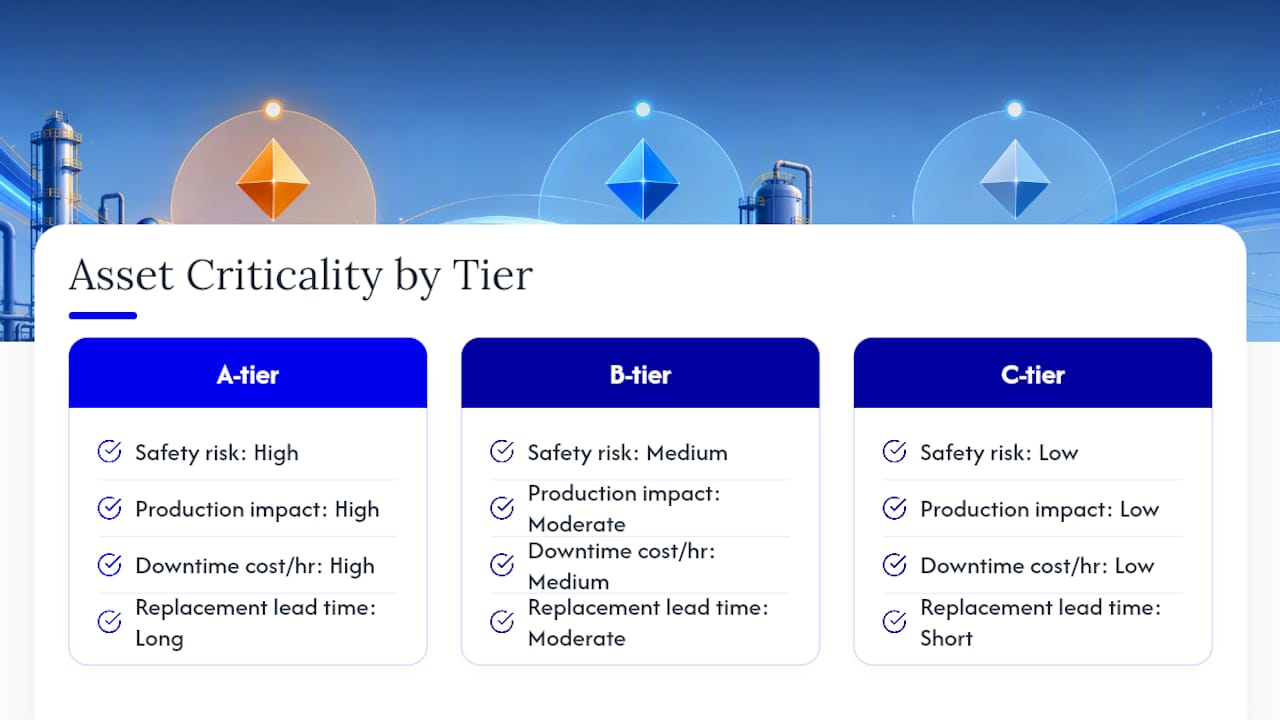
2. Score criticality across five dimensions. Rate each asset on safety risk, production impact if it fails, downtime cost per hour, replacement part lead time, and whether redundancy exists elsewhere in your operation. Roll those scores into an A/B/C tier. A-tier assets get the tightest schedules and fastest response; C-tier assets can tolerate looser windows. Prioritizing by criticality rather than servicing everything at the same frequency is what keeps your labor budget from bleeding out on low-value assets.
3. Set triggers and initial intervals. Start with OEM recommendations, then adjust using Mean Time Between Failures (MTBF) data and your actual operating environment. Dusty warehouses and coastal humidity both shorten realistic intervals versus what a manual assumes. A defensible starting rule: set the interval around 80% to 90% of MTBF, so scheduled service lands comfortably before the failure curve, not right on top of it.
4. Build the checklist and work-order template for each task. This is where you attach the actual standard operating procedure (SOP) to the trigger you just set: torque specs, filter part numbers, inspection points, lockout/tagout steps. The checklist is what a technician executes; the schedule just tells them when to show up.
5. Assign owners, define windows, and communicate the plan. Every scheduled task needs a named owner, a compliance window (how many days early or late is acceptable), and an escalation path if the window is missed. Tighter windows for A-tier assets (plus or minus one to three days on monthly PMs) protect your most critical equipment, while C-tier assets can run wider windows to preserve technician capacity.
6. Pilot, measure, and refine. Run the new schedule against a small set of A-tier assets for 30 to 90 days before rolling it across the full portfolio. Watch whether compliance holds, whether intervals feel too tight or too loose, and whether technicians are actually completing checklists as written. A short pilot surfaces bad assumptions cheaply, before they're baked into hundreds of work orders.
Pro Tip: Run your pilot on the assets where a missed service actually hurts, not the easiest ones to schedule. A clean pilot on low-stakes equipment tells you nothing about whether your compliance windows and escalation paths hold up under real pressure.
What Should a PM Frequency Template Look Like?
A working frequency table doesn't need to be complicated. It needs to be specific enough that a technician knows exactly what to do without calling a supervisor.
| System | Frequency | Example Task |
|---|---|---|
| HVAC | Monthly / Quarterly | Filter replacement monthly; thermal scan of electrical connections quarterly |
| Electrical panels | Quarterly / Annual | Thermal imaging quarterly; full breaker torque check annually |
| Plumbing | Monthly / Annual | Visual leak check monthly; water heater flush and anode inspection annually |
| Backup generators | Weekly / Monthly / Annual | Weekly visual and battery check; monthly load test; annual full service and fluid change |
| Fleet vehicles | Daily / Mileage-based | Daily walkaround inspection; oil and filter service on a mileage-based interval |
Daily tasks are almost always visual: walkarounds, gauge checks, listening for anything unusual. Monthly tasks tend to be consumable replacement, like filters and belts. Quarterly tasks bring in instrumentation, like thermal scans that catch loose electrical connections before they arc. Annual tasks are the deep-service events: full fluid changes, comprehensive inspections, load testing.
Adjust every one of these baselines against three variables: equipment age (older units drift toward shorter intervals), operating environment (a coastal generator needs more frequent corrosion checks than an indoor one), and actual usage intensity. Fleet operations lean particularly hard on mileage and engine-hour triggers over fixed calendar dates, with tiered service levels grouping tasks by effort so a quick oil change and a full transmission service don't share the same interval.
How Do You Prioritize Assets When Resources Are Limited?
No maintenance team has the headcount to service every asset with equal rigor, and pretending otherwise is how budgets and technician hours get wasted on equipment that barely matters if it fails.
- Safety impact: Does failure create injury risk to staff, tenants, or the public?
- Production or operational impact: Does this asset failing stop a process, a building system, or a fleet route?
- Downtime cost per hour: What does an hour of unplanned failure actually cost in lost output or emergency labor?
- Replacement part lead time: Can you get the part in a day, or are you waiting three weeks?
- Redundancy: Is there a backup system, or does this asset failing mean total loss of function?
Score each asset against those five dimensions and roll the total into a tier. A-tier assets (high safety risk, no redundancy, long lead times) get tight compliance windows and often warrant in-house technician attention rather than contractor scheduling. B-tier assets can run on standard windows with a mix of in-house and contractor coverage. C-tier assets tolerate the loosest windows and are usually the first candidates for contractor outsourcing, freeing your internal team's hours for the assets that actually carry risk.
Pro Tip: If your A-tier list has grown to cover half your portfolio, your scoring criteria are too loose. A-tier should represent the assets you genuinely cannot afford to lose, not everything that seems important on a given day.
Why Move Your Schedule Into a CMMS?
A spreadsheet schedule works for exactly as long as someone remembers to open it, update it, and chase down the technician who was supposed to act on it. That's the failure point in most PM programs: not bad intervals, but no system forcing the work to actually happen. Many PM programs stall not from poor planning but from a missing execution layer.
A Computerized Maintenance Management System (CMMS) closes that gap by automating the pieces a spreadsheet can't:
- Auto-generated work orders fire on schedule without a human remembering to create them.
- Mobile checklists put the SOP in the technician's hand on the equipment, not on a printout left in the office.
- Parts reservation flags what's needed for an upcoming PM before the technician arrives on site, cutting the "wait for the part" delay.
- Dashboards give you real-time visibility into compliance rate, overdue tasks, and technician workload without manual tracking.
A schedule that lives only on paper or in a spreadsheet is functionally invisible to the people responsible for acting on it, which is exactly why visibility inside an operational system is the deciding factor in whether a PM program survives its first year.
Migrating into a CMMS doesn't have to happen all at once. Pilot with your A-tier assets first, clean up your asset data before import (duplicate records and missing serial numbers cause more CMMS headaches than any software limitation), use import templates rather than manual entry, and train technicians on the mobile checklist workflow before go-live, not after.
What KPIs Tell You a Schedule Is Working?
A preventive maintenance schedule you never measure is a guess dressed up as a plan. Four numbers tell you whether yours is actually earning its keep.
- PM compliance rate: the percentage of scheduled tasks completed within their window. A commonly cited target is 90% or higher; consistently missing it signals either unrealistic scheduling or insufficient staffing.
- Mean Time Between Failures (MTBF) trend: if MTBF is climbing on assets under active PM coverage, your intervals are working. A flat or declining trend means it's time to tighten.
- Planned maintenance percentage: the share of total maintenance hours spent on planned work versus reactive firefighting. Higher is better, and it should climb steadily as your program matures.
- Emergency work rate: the percentage of work orders that originate from a breakdown rather than a schedule. A rising rate is your clearest early warning that something in the schedule has drifted.
Review these numbers quarterly, and run a full interval refresh annually using a fresh look at OEM updates, MTBF data, and any operating-environment changes. Outside that normal cadence, an out-of-cycle review is warranted any time an asset fails between scheduled services, when a new regulatory requirement lands, or when a vendor issues a safety bulletin. Fleet managers in particular should track NHTSA recall notices for safety-critical vehicle components and fold any open recall directly into the next scheduled service window. As a rule: shorten intervals when failures cluster before the scheduled date, extend them when assets consistently outlast their service window with no signs of wear, and switch trigger types entirely when a fixed-calendar asset starts showing usage patterns too irregular for a calendar to track well.
How Should Property Portfolios Operationalize PM Scheduling?
Across a rental portfolio, a preventive maintenance schedule is a tenant retention tool as much as an equipment strategy. Owners who track maintenance quality against tenant retention consistently find the two move together, and a resident who never deals with a broken furnace renews far more readily than one who's called maintenance twice this year.
Property managers handle this at scale by tying vendor coordination, tenant communication, and owner-facing reporting into a single operational rhythm, not three disconnected processes competing for attention on the same Tuesday.
— Chaim
Let Milwaukeepm Handle the Schedule While You Keep the Returns
Building and running a preventive maintenance schedule takes real staff time: inventorying units, chasing vendors, logging compliance, and fielding tenant calls when a filter gets missed. Milwaukeepm removes that workload entirely for owners who'd rather collect rental income than manage a maintenance calendar.
Milwaukeepm coordinates scheduled vendor visits, handles tenant communication around maintenance windows, and delivers transparent monthly reporting so you always know what was serviced and when. Preferred vendor relationships mean parts and labor get sourced without you fielding a single phone call, and the owner and tenant portals keep every request and completed task visible in one place. For commercial owners, the same discipline applies through Milwaukeepm's commercial management services, which extend scheduled upkeep across larger, more complex properties.
If you're ready to move maintenance off your own plate, visit Milwaukeepm to see current property management services and request a consultation on your portfolio.
Key Takeaways
A preventive maintenance schedule works best when it separates trigger timing from task checklists, ranks assets by criticality, and runs inside a system that enforces execution rather than a spreadsheet that hopes for it.
| Point | Details |
|---|---|
| Separate schedule from checklist | Keep the "when" (trigger and frequency) and the "what" (task list) as distinct, linked documents. |
| Score criticality before scheduling | Rank assets by safety, downtime cost, and lead time to set A/B/C tiers before assigning intervals. |
| Set intervals at 80% to 90% of MTBF | Use OEM guidance as a starting point, then tighten based on failure data and operating environment. |
| Automate execution through a CMMS | Auto-generated work orders and mobile checklists close the gap that spreadsheets leave open. |
| Track compliance quarterly | Target 90%+ PM compliance and review MTBF and emergency work rate every quarter. |
| Milwaukeepm manages it end to end | Milwaukeepm coordinates vendor scheduling, tenant communication, and owner reporting so property owners never build the schedule themselves. |
Sources
A few sources are worth keeping on hand as you build out your own program:
- Preventive maintenance glossary — Tractian
- Preventive maintenance checklists — Flowpath
- Preventive maintenance schedule template for facility equipment — OxMaint
Recommended
- Daily Manager Tasks: The Essential Daily Duties of a Property Manager
- Effective Management Practices for Milwaukee Rentals
- Milwaukee Rental Management Tips: Choosing Milwaukee Property Managers Wisely
- Uncovering the Power of Property Management in Milwaukee: Elevating Your Investment with Expertise and Excellence